
Choosing the Right NPU for Edge AI Solutions
The best NPU on paper may not run your model. We tested an open model on a Qualcomm chip and a Hailo chip to see how the practical differences play out.

Written by
Karol Adamiak
Software Engineer

An NPU is a computing unit dedicated to running AI and machine learning algorithms. It is designed to use less power than a CPU or GPU, which is crucial on constrained edge devices. We described the performance gains from NPUs vs. CPUs in a previous article. We also showed how to optimise that solution to get the full power out of the device.
What we have not covered is how to choose the right NPU for a specific use case.
There are many vendors on the market. Some sell dedicated external units, such as Hailo, Google Coral and DeepX. Others integrate the NPU into a single chip, such as Qualcomm, Broadcom, Amlogic and Realtek. They differ in compute capability (quoted in TOPS, or trillions of operations per second), in the data formats they support (whole number “int” or decimal “float”), and ecosystem maturity.
For this comparison, we use Qualcomm Dragonwing™ QCS8550 and Hailo-10H because we know them well. We work with both and many other silicon vendors. The judgements here are subjective, and neither Qualcomm nor Hailo influenced what we wrote.
How the NPU is built into your system
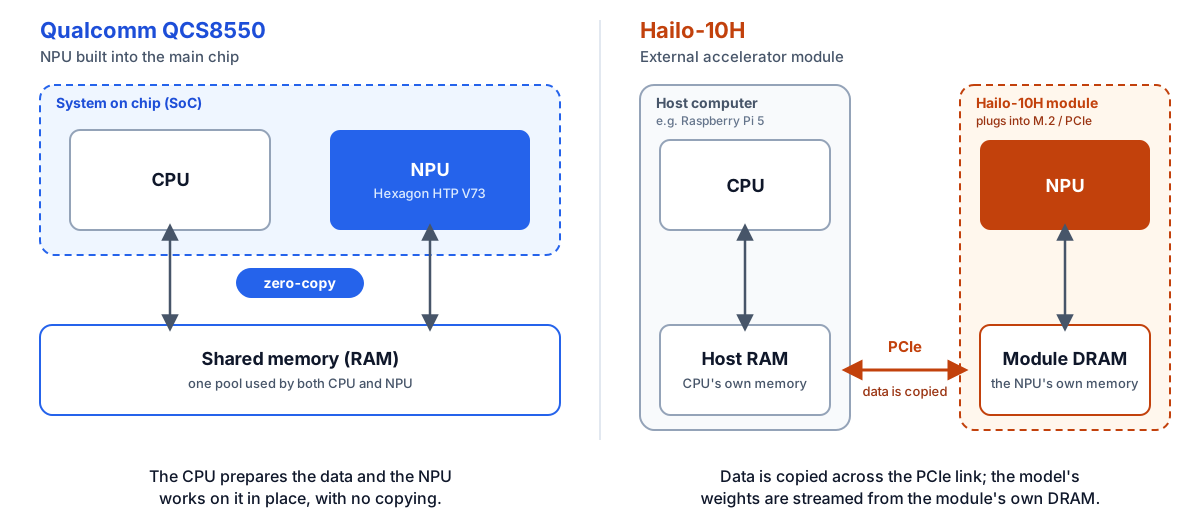
The main physical difference between NPUs comes down to how they’re integrated into the system. The chip can act as an independent, external accelerator talking to the computer over PCIe or USB, or it can be part of a single integrated processor known as a system-on-chip (SoC). Some Hailo chips, such as the Hailo-10H, are external accelerators; others, such as the Hailo-15, are SoCs with a built-in NPU, like Qualcomm’s QCS8550.
Hailo can also be mounted on a dedicated circuit board, but that requires substantial engineering effort, which is why Hailo sells modules for connectors such as M.2. A Qualcomm NPU shares memory with the rest of the chip, which allows ‘zero-copy’ operations: the CPU can prepare the data, and the NPU can work on it directly, with no copying in between, which saves resources.
Which models the vendors support
When you pick an NPU, check which models the vendor officially supports and how much community support exists. Both vendors publish lists, with models grouped by application area.
| Qualcomm | Hailo | |
|---|---|---|
| Published list | Qualcomm AI Hub models (over 250 models supported) | Hailo Model Zoo public models and Hailo GenAI models (nearly 120 models supported) |
| Application areas |
|
|
Qualcomm supports more models than Hailo. That is not a weakness of Hailo. Qualcomm makes high-end smartphone chips that have also been used in personal computers for several years, while Hailo’s chips started with computer vision (Hailo-8, Hailo-15); the Hailo-10H adds generative AI.
What if you have an unsupported model?
Both vendors provide tools to convert models they do not officially support. To compare them, we used Laya, an open model that has attracted recent attention but that neither vendor lists (as of early November 2026). Laya belongs to a family called “non-autoregressive System 1 decision models”. You can find it on Hugging Face.
What is Laya?
Laya is a decision model: it reads text and answers questions with predefined options by returning a probability distribution.
It does not write a reply in words. It scores each option in a single pass through the network, so it can only choose from the answers you supply; it cannot invent one (though it can still pick the wrong one). It supports three question types: pick one option, rating on a scale, and yes/no.
Example. A customer writes: “Hello, we paid twice for March. Please refund the duplicate payment today; otherwise, we will cancel our subscription.”
| Question 1 (multiple choice) | Which department should handle the case? |
|---|---|
| Options | billing (invoices, payments, refunds), technical support (bugs, outages), other. |
| Question 2 (yes/no) | Is the customer threatening to cancel? |
Example model output (illustrative figures):
| Department | billing 0.97 · technical support 0.02 · other 0.01 |
|---|---|
| Cancellation risk | yes 0.91 · no 0.09 |
The application can use the highest score straight away, for example, to route the case to billing and flag it as urgent. The scores also show how confident the model is. When confidence is low, the decision can go to a person or to a larger language model (LLM).
The conversion tools each vendor provides
- Qualcomm’s QAIRT SDK, which runs locally, and Qualcomm AI Hub, a cloud service built on it.
- Hailo AI SW Suite, a Docker image containing all the tools needed to work with models, with no cloud solution provided. Container-based distribution allows users to deploy the tools themselves on a cloud machine with the required resources.
Both vendors provide software that can run locally on your own machine, which is particularly important when your model, or the data used to calibrate it, must not leave your premises.
What happened when we prepared Laya for Qualcomm and Hailo
Laya is based on the ModernBERT architecture. Like some other models, it contains extreme values inside the network. In a few channels of the data stream, the working values (known as activations) reach around 20,000, while typical values range from 1 to 6. Engineers call these “massive activations”.
Note: This is one model on one NPU from each vendor, so treat the results as an example, not a ranking. On Hailo, we tested Laya’s base encoder (ModernBERT-large, 128 tokens), and the accuracy figures come from Hailo’s emulator because no full model was compiled.
| Hailo-10H | Qualcomm QCS8550 (Hexagon HTP V73) | |
|---|---|---|
| Number formats | Whole numbers only (int8 or int16) | FP16 supported natively |
| Outcome | No working model. The compiler crashed on the full model, and the quantized version was too inaccurate to use. Only 1- and 4-layer slices ran on the chip. | Prepared without quantization or calibration |
| Quality | Output similarity to the original (1.0 = identical): 0.44 with int8, 0.64 with the best mixed-precision variant. Without rounding: 1.00. | 48 of 48 decisions matched the CPU, mean probability difference 0.0007 |
| Speed | Not reached | 48.5ms per decision, against 1.29s on the QCS8550’s own CPU cores: ~27x faster |
Hailo-10H
The Hailo-10H does not support floating-point (decimal) numbers and computes activations only in int8 or int16, which are whole numbers. A whole-number format has a narrow range, so a scale wide enough to cover the 20,000 leaves ordinary values of 1 to 6 rounded down to nothing. With int8 quantization, more than 95% of the values in the main data stream were reduced to zero. The similarity of the output to the original fell to 0.44 (1.0 means identical), and the best mixed-precision variant reached only 0.64. Without rounding, the same conversion scored 1.00, so the problem was the number format, not the conversion.
Separately, Hailo’s compiler crashed every time on the full model, after about 55 minutes of compiling, so no runnable file was ever produced. Slices of 1 and 4 layers compiled and ran on the chip.
This is a known issue. The authors of the browser-based version of Laya (nvkudva/laya-onnx-q8 on Hugging Face) report that decision agreement drops to 69% when activations are quantized, so they quantize only the weights (the model’s stored parameters) and keep the working values at higher precision.
Qualcomm QCS8550 (Hexagon HTP V73)
The Qualcomm chip supports FP16 natively. This preserves extreme values when the model is prepared for the NPU, so there was no need for quantization or the calibration that goes with it. After conversion, the model kept its output quality: 48 of 48 decisions matched those on the CPU, with a probability difference of around 0.0007. A single decision took 48.5ms instead of 1.29s on the CPU, a ~27x increase in speed.
A chip without FP16 is not necessarily at a disadvantage. It may be cheaper, more power-efficient, and perform very well with quantized models, which are models compressed to use whole numbers. It all depends on your use case.
What to ask before you choose an NPU
(testing your own model on the hardware you are considering is the most reliable way to find out)

How does the NPU connect to the rest of your system, and what will that cost in design effort?

Is your model on the vendor's list and, if not, can the vendor's tools convert it without losing required accuracy?

Which number formats does the chip support, and does your model need them?
Not sure which NPU will meet your accuracy and response-time needs?
We can help you check the hardware you are evaluating against your requirements and bring your Edge AI solution to life.
The export and benchmark code for running Laya on the Qualcomm QCS8550 is on GitHub, and the exported model is on Hugging Face. Neither includes the Qualcomm SDK, and the GitHub repository does not include Laya itself, so download those under their own licences.
Some images on this page are AI-generated and used for illustrative purposes.
Related Insights
Guides
RAM is the new gold. Dig deeper for it with ZRAM
This article explores how much headroom you can still recover on broadband devices you have already deployed by compressing memory with ZRAM.

Articles
Generative AI at the Edge: What’s Possible in 2026
Advances in NPU capabilities and quantization have enabled more sophisticated AI models running locally for low-latency, lower-cost and secure applications.
Articles
The Joy of PoCs
Why a small and early proof of concept (PoC) can save you much, much more in the long run.