
Generative AI at the Edge: What’s Possible in 2026
Advances in NPU capabilities and quantization have enabled more sophisticated AI models running locally for low-latency, lower-cost and secure applications.

Written by
Karol Adamiak
Software Engineer

Executive Summary (TL:DR)
- Some AI jobs that used to need a data centre can now run on the device itself, including understanding images, following voice commands and translating speech.
- Two advances make this possible: NPUs (chips built for AI) and quantization (a way to shrink models so they fit on available device memory).
- The results presented here are single runs on one development kit. Whether it works for your product depends on your model, your hardware and your data, so test with your own.
Why run AI on the device?
AI that runs on the device itself, instead of in the cloud, is called edge AI. Cloud AI (particularly using models based on the Transformer architecture) gets most of the attention, but running locally has two main potential benefits:
- If processing is local, input data doesn’t have to leave the device, giving you more control over privacy and security.
- There is no round trip to the cloud to wait for, and the system can keep working offline, with low latency, if the model and the data it needs are stored on the device.
Running locally has limits too. Hardware, power, temperature, memory and software all set a ceiling.
This article looks at what modern AI models can do within those limits, using real results from our own tests.
What edge AI could already do
Edge AI use cases are not new. For years, devices have been able to:
- Machine vision:
- Detect specific types of objects, for example:
- Vehicles and license plates
- People and personal protective equipment
- Classify images
- Estimate human pose, gaze direction, and head orientation for safety applications, such as driver-monitoring cameras in vehicles
- Detect specific types of objects, for example:
- Audio classification:
- Detect specific sounds, such as gunshots or breaking glass
- Detect anomalous sounds, such as a gas leak or unusual equipment noise, for predictive maintenance
- Detect anomalies and classify odd readings in sensor data such as pressure, vibration, temperature or movement, in equipment and in wearables
What the newer models add
Newer models are built on the Transformer architecture that powers today’s large language models, the AI behind chatbots and voice assistants. That architecture has significantly widened what edge devices can do, including things that were far harder a few years ago:
- translating and transcribing speech in near real time
- spotting anomalies without pre-training the model
- voice control that copes with more natural speech
- finding objects from a plain-text description (open-vocabulary), instead of from a fixed list of object types the model was trained to recognise
All results come from real model runs on the Qualcomm RB5 Gen 2 Development Kit, built on the Qualcomm Dragonwing™ QCS8550 platform.
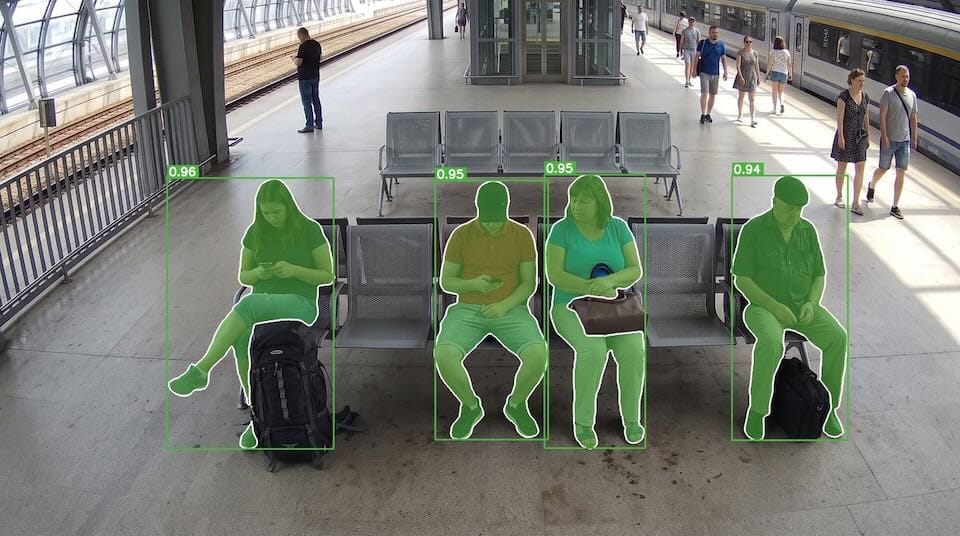
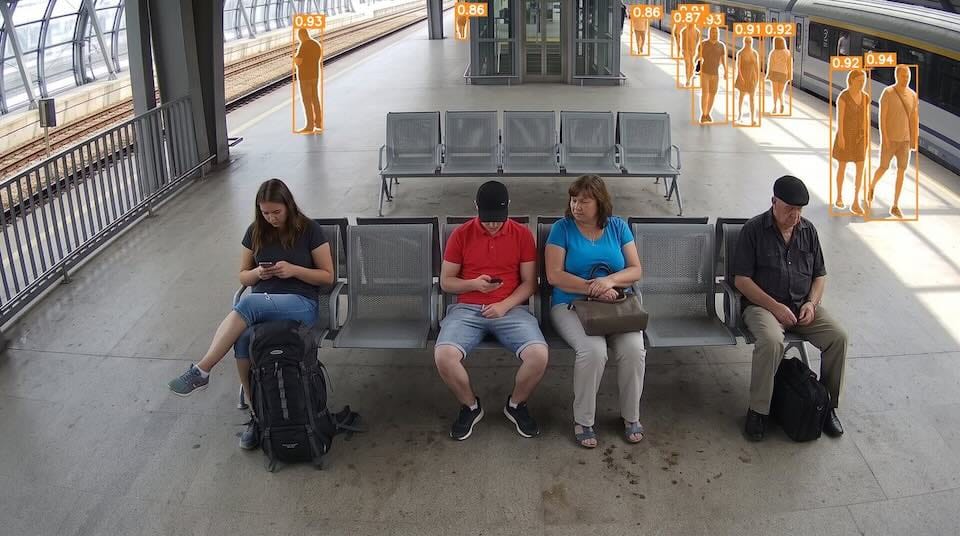
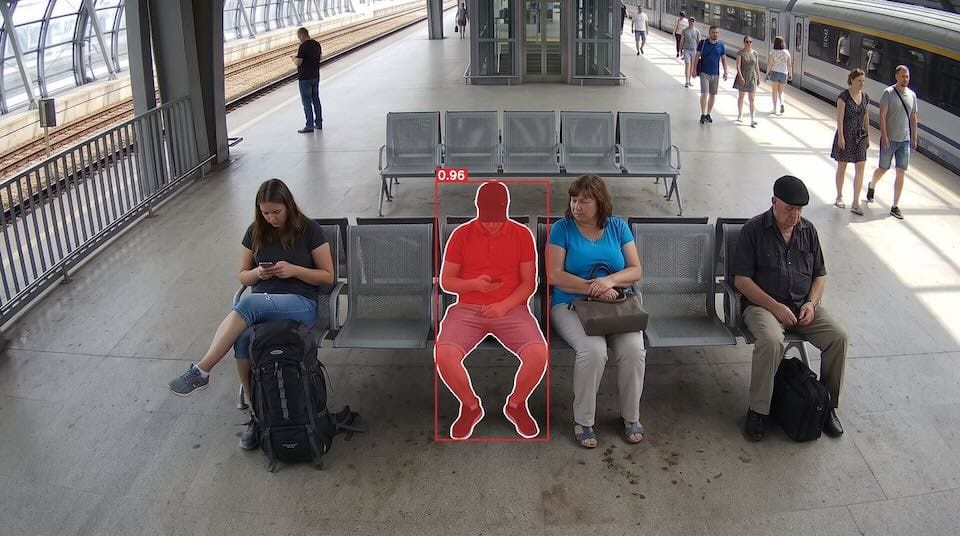
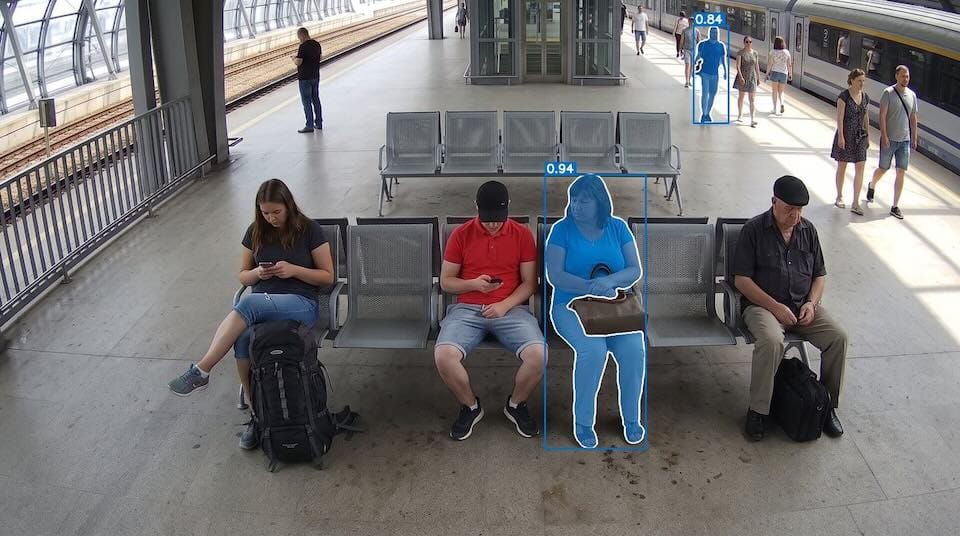
Finding people from a short text description (with SAM 3)
SAM 3 (Segment Anything Model 3) is an image model that finds objects from a short text description. Type “seated person” or “person in a red shirt”, and it outlines every match in the picture.
This is not general scene reasoning, and the results below should be treated as the outcome of a specific experiment rather than a guarantee of performance in every scene.

Asking a camera questions (with a VLM)
For example, you can now pass images from hotel cameras to a compact vision-language model (VLM), an AI model that understands pictures and text together.
You ask it questions in plain English, such as “Is the area dirty?” or “Is anything blocking the walkway?”
We tested the idea with three questions on two lobby images, using Qwen3-VL-4B, a compact VLM.
For a hotel, this could mean staff are alerted to a spill or an unattended bag without anyone watching a screen.
Each result here is a single run, though. A deployed system would need testing on a representative set of images, covering different lighting, camera positions, objects in the way and unusual cases.
The technical details of the setup are in the “For engineers” section at the end of this article.

| Prompt | Response from Qwen3-VL-4B-Instruct (W4A16) |
|---|---|
| Are the pillows on the couch neatly arranged and in order? | Yes, the pillows on the couch are neatly arranged and in order. |
| Is there mud or dirt on the floor? | No, there is no mud or dirt on the floor. |
| Is there a bag left without supervision (no person next to it)? | No, there is no bag left without supervision in the image. |

| Prompt | Response from Qwen3-VL-4B-Instruct (W4A16) |
|---|---|
| Are the pillows on the couch neatly arranged and in order? | No, the pillows are not neatly arranged and in order; they are scattered and mismatched. |
| Is there mud or dirt on the floor? | Yes, there is mud or dirt on the floor. The dark, wet-looking substance on the tiled floor appears to be a liquid spill, possibly from a wet area or an accident, which has splattered and created a muddy or dirty appearance on the floor. |
| Is there a bag left without supervision (no person next to it)? | Yes, there is a black bag left without supervision, as it is placed on the floor near the centre of the room, with no person nearby. |
In these two images, the answers matched what we could see.
Does the carrot have two legs? (with a VLM)
The same approach works for inspection. Here the model looks at two carrots and answers two questions about each: is it damaged, and is its root forked into two branches, like legs?

| Prompt | Response from Qwen3-VL-4B-Instruct (W4A16) |
|---|---|
| Is the carrot damaged (rot, cracks, holes, broken parts)? | Yes, the carrot is damaged with a visible rot and a crack or break near the middle. |
| Does the carrot have two “legs”, i.e. is its root forked into two branches? | No, the carrot is not forked into two branches; it is a single, elongated root with a smooth surface. |

| Prompt | Response from Qwen3-VL-4B-Instruct (W4A16) |
|---|---|
| Is the carrot damaged (rot, cracks, holes, broken parts)? | No, the carrot is not damaged; it is a naturally occurring, unbroken root vegetable with an unusual shape. |
| Does the carrot have two “legs”, i.e. is its root forked into two branches? | Yes, the carrot’s root is forked into two distinct branches, resembling legs. |
Again, the responses matched the pictures. On a line, this could mean damaged or forked produce is flagged automatically, but two carrots show what is possible, not how it would perform across a whole batch.
Voice control (Voice UI)
Visual capabilities enable a wide range of applications, but voice-based application control is equally important.
Suppose we have a loyalty card or a preferred fuel-station brand. While driving, we could ask a model running locally in the vehicle to add a stop at station “X” to our route, using offline maps, so we can have our favourite coffee while refuelling. All of this could be done without taking our eyes off the road.
We’ve already shown the building blocks. At CES 2026, we demonstrated an AI media station with Qualcomm that combined a speech-to-text model with a small language model tuned for the job.
We later demonstrated a voice-controlled retail kiosk that works with no cloud dependency and runs on Qualcomm Dragonwing™ IQ9.
What makes these Edge AI applications possible?
Two advances make this possible: better software, in particular quantization, and more capable NPUs.
NPUs
An NPU (neural processing unit) is a chip built to run the calculations that AI models rely on.
Compared with a general-purpose graphics chip (GPU), it can use less energy for the models it supports, especially quantized models. How much you gain depends on the model, the software that runs it, and how fully you use the NPU.
We discussed the increase in processing capability and efficiency in a previous article: NPU vs CPU for Edge Vision: Less Heat & Power, More Headroom
Many earlier edge chips were built mainly for low-precision whole-number maths such as INT8. Newer ones increasingly support mixed precision and floating-point formats, which are more precise. The QCS8550 supports INT8, A16W8 and FP16 (amongst others), which are ways of storing numbers; the next section explains them.
Quantization
Models are trained with precise numbers. For years, the standard format was FP32, which holds about seven significant decimal digits. Large models today are usually trained with a mix of formats such as FP16 or BF16, keeping some parts at higher precision. Devices with limited power and memory often need the model squeezed further.
Quantization does that by storing the model’s numbers in fewer bits. These are its weights (what it learned in training), its activations (the values it passes between layers) and other parts. An INT8 value can take only 256 different values, typically from -128 to 127, so you might expect a big loss of accuracy.
In practice, the loss is small because the model’s internal parameters (often called weights) are tightly clustered around zero. For example, in the YOLOv5s (Ultralytics YOLOv5 v7.0) model, 99.7% of its 7.2 million initial parameters sit between ±0.1. When the model’s math is simplified to run faster on specialised AI chips (NPUs), these values spread out slightly—with 99% falling between -0.36 and +0.28, though this exact range can still vary significantly across different parts of the model.
Ranges also vary a lot from layer to layer, sometimes by several dozen times. So a quantizer does not need one range for the whole network. It can give each layer, and even each output channel (one of the separate outputs a layer produces), its own scale, so the 256 levels cover the range that part of the model uses.
The table below illustrates the idea with two example layers. Each layer’s own range is stretched to fill the same 256 levels.
| Network layer | Range of original (FP32) values | Scale (multiplier) | Example: FP32 value to INT8 value |
|---|---|---|---|
| Layer A (narrow range) | -0.1 to +0.1 | × 1270 (large) | 0.081 → 103 -0.042 → -53 |
| Layer B (wide range) | -0.9 to +0.9 | × 141 (small) | 0.850 → 120 -0.120 → -17 |
A narrow range needs a large multiplier to fill the 256 levels, and a wide range needs a small one.
Two methods help keep the quality loss small. Post-training quantization (PTQ) shrinks a model after it has been trained. Quantization-aware training (QAT) trains the model with the rounding built in.
How much quality you lose still depends on the model, the task, the way you measure it, the target precision, the calibration data (sample data used to choose the ranges), and how well the software supports the maths involved, so check it against a representative set of validation data (data held back to test quality).
On hardware that supports lower precision natively and well, quantization makes models smaller, cuts memory use, and can improve speed and energy efficiency.
Could your product run its AI on the device?
Some AI applications that once needed the cloud can now run locally on the device (edge AI).
The only reliable way to find out is to test with your own data.
If you are thinking about moving a product’s AI processing from the cloud to the device, or about deploying something that privacy and data-security concerns have previously held back, we can help you test what is feasible before you commit to hardware.
How Qwen3-VL-4B ran on the board
- We ran Qwen3-VL-4B-Instruct locally on the RB5 Gen 2 (QCS8550) using a Qualcomm AI Hub package in W4A16 precision, with QAIRT 2.45 and GenieX 0.3.17.
- The model’s neural network (the image encoder and 36 language-decoder layers, including the logits output) is compiled into five QNN HTP backend graphs that run on the Hexagon V73 NPU.
- The weights are 4-bit, the activations at graph boundaries are 16-bit, and the KV cache is 8-bit.
- The CPU handles tokenisation, embedding-table lookup, preparing the image as 256 visual tokens, next-token selection and execution control.
- The GPU is not used. HTP operator-level profiling is not available, so we do not state the NPU’s share of total execution time.
Some images on this page are AI-generated and used for illustrative purposes.
Related Insights
Articles
The Joy of PoCs
Why a small and early proof of concept (PoC) can save you much, much more in the long run.
Articles
Fastest Doesn’t Always Mean Best: Optimising an Edge AI Pipeline on Rubik Pi 3
The fastest Edge AI pipeline isn’t always the right one: Python, C++, and GStreamer on the Rubik Pi 3’s NPU, compared on speed, CPU, memory, […]

Videos
Simply Explained: Why Your Router Should Be Doing the AI in the Connected Home
Watch our CTO, Rahul Mehra, unpack the full case for anchoring edge AI in the broadband router.