
NPUs vs CPUs for Edge AI Vision: Less Heat, Less Power, More Headroom

Written by
Karol Adamiak
Software Engineer

Executive Summary (TL:DR)
The challenge
Industrial vision systems that run AI inference on a CPU alone draw more power and generate more heat than the workload should require. Run two models per frame, such as person detection followed by PPE detection, and that overhead compounds. In a sealed, IP-rated enclosure with no active cooling, the result is thermal throttling: the chip slows itself down to survive, and throughput drops with it.
What we tested
The same cascaded vision pipeline (person detection → PPE detection), running identical quantised INT8 models, on a standard CPU (Raspberry Pi 5, Broadcom BCM2712) and on an NPU-enabled device (CPU + NPU) (Thundercomm Rubik Pi 3, Qualcomm QCS6490 chipset). A third, control run uses the same Rubik Pi 3 board with NPU offload disabled, which rules out “it’s just a faster chip” as the explanation.
The result
Offloading inference to the NPU delivers 8.7× higher throughput, 11× better energy efficiency (FPS/W), and an SoC running ~16°C cooler, with the same model and the same pipeline. You can claw some of that throughput back by giving the CPU all its cores, but only by pushing it past its thermal-throttling threshold and up its power draw (see ‘What if you give the CPU more threads?’).
The control run confirms the CPU’s own speed accounts for almost none of the NPU’s advantage; the rest comes from the NPU doing the work the CPU otherwise would. Less heat and less power aren’t just efficiency wins; they determine whether a device can be sealed into an industrial enclosure and run on PoE at all.
| Parameter | RPi 5 (CPU) | Rubik Pi 3 (NPU) | Gain |
|---|---|---|---|
| Throughput | 3.91 FPS | 34.22 FPS | 8.7× |
| Power draw | 5.56 W | 4.40 W | 1.3× |
| Max SoC temp. | 70 °C | 54 °C | −16 °C |
| Energy / frame | 1423 mJ | 129 mJ | 11× |
What this means if you’re specifying hardware
An NPU doesn’t just make inference faster. It changes what kind of device you can build:
- Sealed enclosures become viable. A single CPU thread is cool but far too slow; to reach a usable frame rate, the CPU needs all its cores, and then it dissipates ~7–10 W and climbs past ~85 °C, which is more heat than a dust- and water-tight enclosure can shed without a fan. The NPU sustains its full ~34 FPS at roughly 54 °C, eliminating the vents, dust-ingress risk, and maintenance burden associated with active cooling.
- Power over Ethernet stays comfortably inside budget. At 4.4W, there’s significant headroom within even the basic 802.3af PoE limits, enough to power extra sensors or peripherals over the same cable.
- There’s real headroom to scale. Spare thermal and power budget means the option to add cameras, another model, or handle busier scenes later, without redesigning the enclosure or power supply.
The benchmark behind these numbers, including the control run that isolates the NPU’s contribution from raw CPU speed, is below.
The challenge: Why PPE detection pipelines overheat standard CPU
PPE detection is one application within the broader category Consult Red works in: Edge AI-enabled industrial vision that detects safety, quality, and compliance issues in real time, without sending footage to the cloud.
Workplace safety (H&S) monitoring systems on construction sites and factory floors verify whether workers are wearing the required protective equipment (hard hats and hi-vis vests). Processing locally on the edge device has two huge advantages: latency (results are returned almost instantly, with no round-trip to the cloud) and privacy (CCTV footage never leaves the facility).
The solution has a cascaded, two-model architecture:
- Person detection – the first model (
foot_track_net) scans the full frame and returns silhouette bounding boxes. - Crop – for each detected person, we crop their region from the original frame.
- PPE detection – the second model (
gear_guard_net) analyses each crop separately, detecting the hard hat and vest.

This is why the load is non-linear: for N people in frame, we run 1 person-detector inference + N PPE-detector inferences per frame. On a crowded floor, a single frame means a dozen-plus inferences. On a standard CPU, this pipeline quickly exhausts the per-frame time budget and, worse, falls into thermal throttling: the chip overheats, clocks down and FPS drops further.
Test setup: Raspberry Pi 5 vs Rubik Pi 3 (Qualcomm QCS6490)
Hardware
| Device | Raspberry Pi 5 | Thundercomm Rubik Pi 3 |
|---|---|---|
| SoC | Broadcom BCM2712 (4× Cortex-A76 @ 2.4 GHz) | Qualcomm QCS6490 (8× Kryo 670, up to 2.7 GHz) |
| Accelerator | none (inference on CPU, XNNPACK) | NPU: Hexagon HTP |
| OS / kernel | Ubuntu 24.04.4, kernel 6.8 | Ubuntu 24.04.4, kernel 6.8 (qcom) |
| Python / TF | 3.12.3 / LiteRT (ai-edge-litert) | 3.12.3 / LiteRT (ai-edge-litert) |
Both devices run the same INT8 model files (downloaded from All Models – Qualcomm AI Hub); to keep the comparison fair, only the execution path differs: CPU vs NPU.
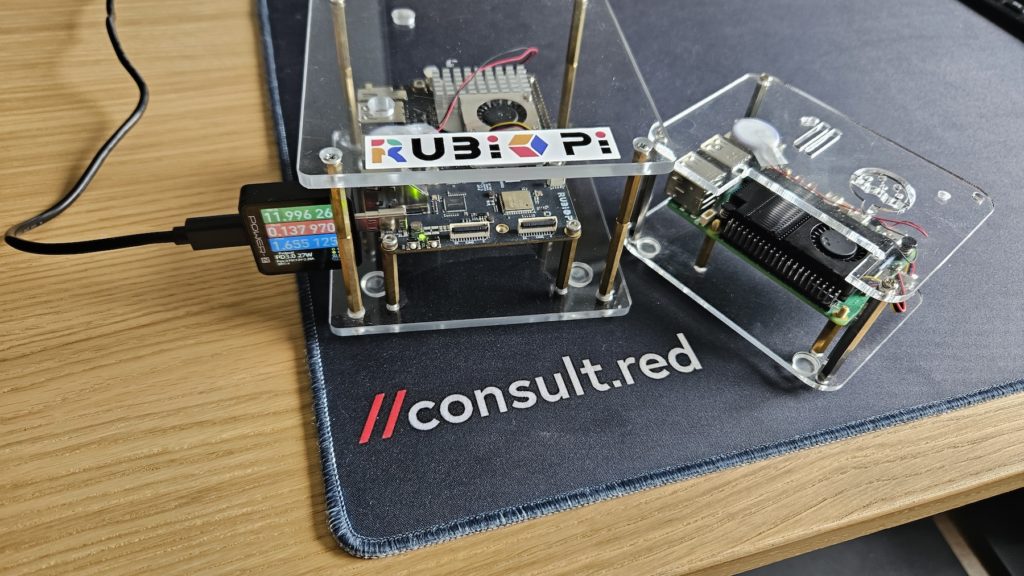
Control run: the Rubik Pi’s CPU alone
To pre-empt the objection that “the Rubik is faster simply because it has a more powerful CPU than the Raspberry Pi”, we added a third run: the Rubik Pi 3 with the Hexagon delegate disabled – same board, inference on the CPU only. If the NPU advantage came from the processor, this run would land close to the NPU version. It doesn’t (see ‘Benchmark results’).
Enabling NPU acceleration in LiteRT: the code change
The same code, the same INT8 model; the only difference is loading the Hexagon HTP delegate and passing it in experimental_delegates:
Raspberry Pi 5 – CPU
from ai_edge_litert import interpreter as litert

...

interpreter = litert.Interpreter(

------model_path=str(model_path),

------experimental_delegates=None,  # CPU: XNNPACK, single thread by default

)

...
Rubik Pi 3 – NPU (Hexagon HTP)
from ai_edge_litert import interpreter as litert

...

delegate = litert.load_delegate(

------"libQnnTFLiteDelegate.so",

------options={"backend_type": "htp", "htp_performance_mode": "2"},

)

interpreter = litert.Interpreter(

------model_path=str(model_path),

------experimental_delegates=[delegate],

)

...
This single change (loading libQnnTFLiteDelegate.so and passing it in experimental_delegates) moves the compute from the CPU cores to the NPU (Hexagon HTP). The rest of the application (video decoding, NMS, post-processing, drawing) stays identical; only where inference runs changes. The htp_performance_mode value (here 2) controls the delegate’s performance profile. The full list of options is documented in the Qualcomm documentation.
Benchmark results: throughput, power, and temperature
Methodology
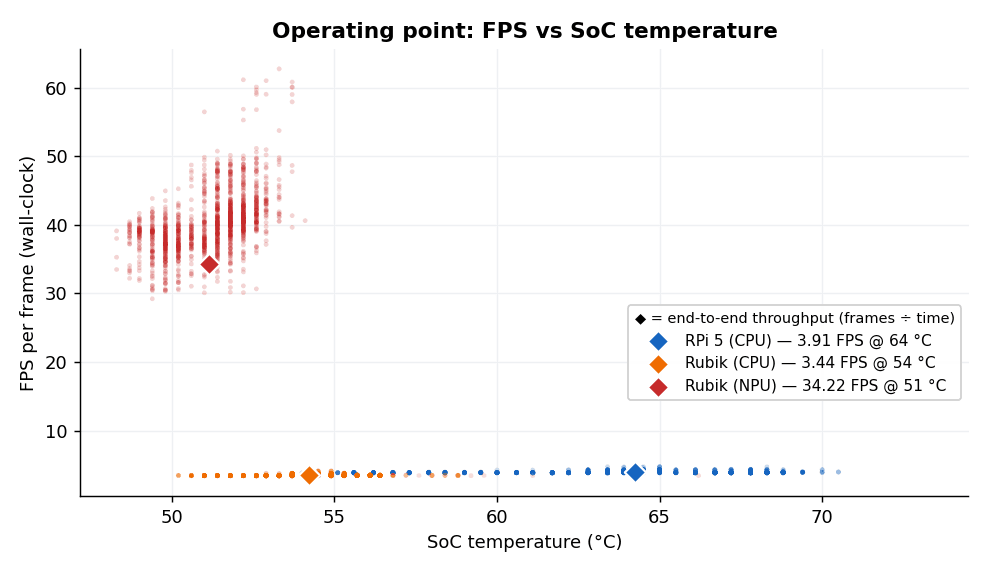
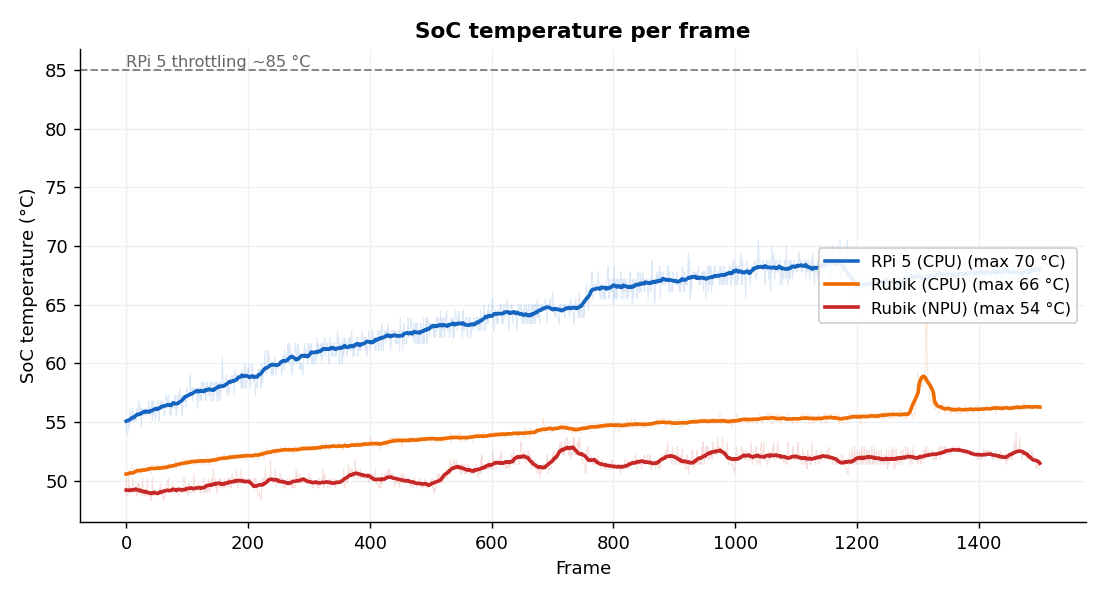
Each run is the same set of 6 video files (1501 frames, single-threaded Python pipeline). Power draw is measured with an external, high-precision USB meter (ChargerLAB Power-Z KM003C) and logged to a file via its dedicated app for later analysis. Temperature is read from the system sensors (/sys/class/thermal) once per frame. FPS is measured end-to-end: frames per second from grabbing a frame all the way to the final result (whether a given person is wearing a hard hat and vest), including decoding, frame resizing, both cascade inferences, NMS and post-processing, not the model inference time alone.
Measurement integrity
To force purely passive cooling, we disconnected the fans from their PWM headers on both boards before applying power, so all heat is dissipated by the heatsink rather than by active cooling. To avoid skewing the current measurements on the Raspberry Pi 5, we used an SD card as the operating system medium instead of an NVMe drive, which would draw significant extra current. The Rubik Pi 3 uses its built-in 128 GB UFS 2.2 storage.
| Parameter | RPi 5 (CPU) | Rubik Pi 3 (CPU) | Rubik Pi 3 (NPU) |
|---|---|---|---|
| Avg. time / frame | 255 ms | 288 ms | 25 ms |
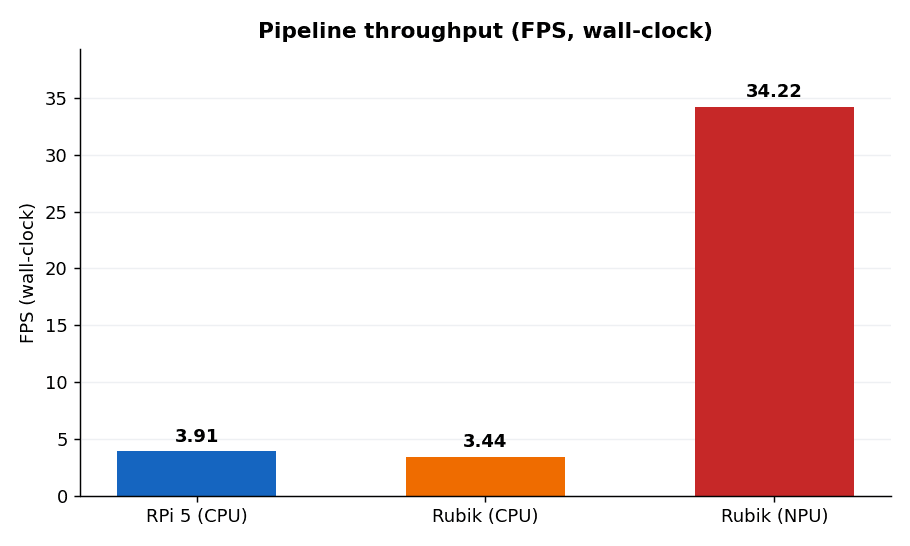
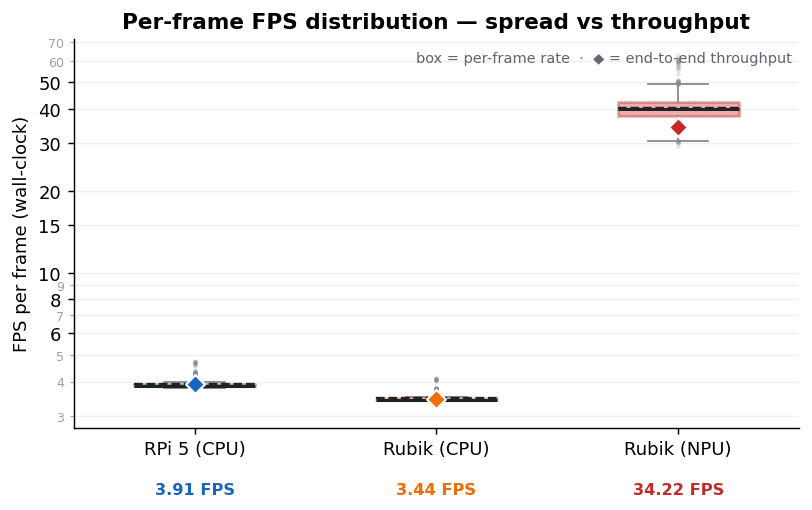
| Throughput (FPS) | 3.91 | 3.44 | 34.22 |
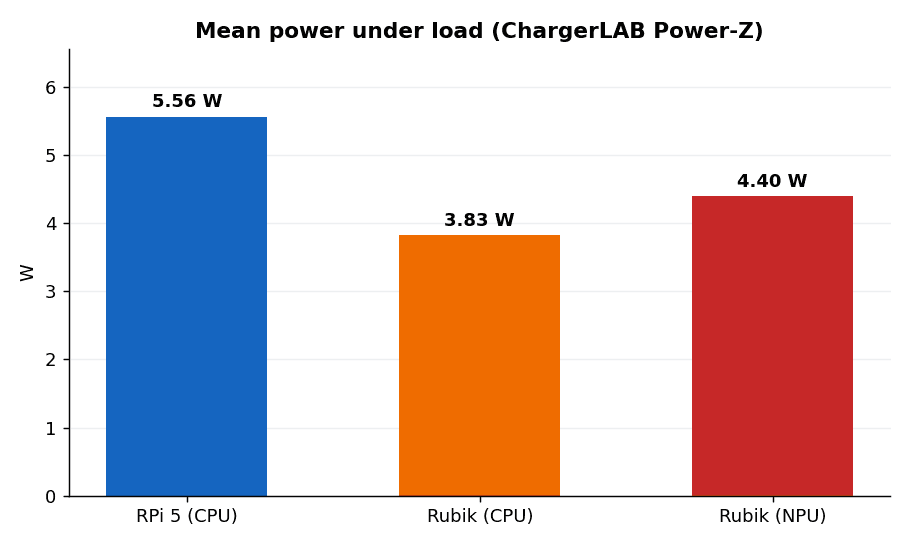
| Power draw (Power-Z) | 5.56 W | 3.83 W | 4.40 W |
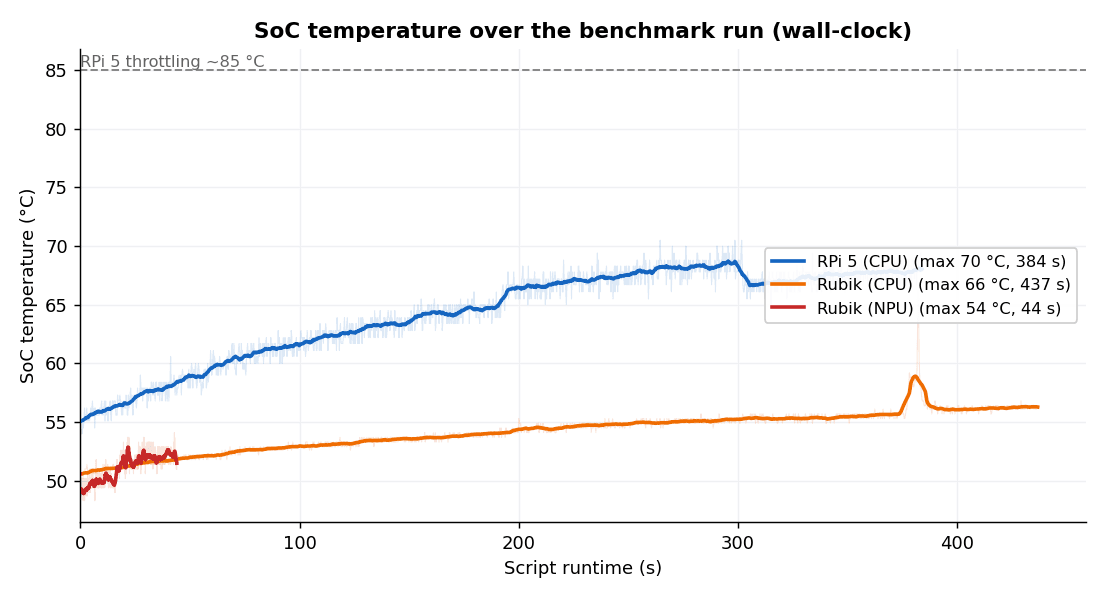
| Max SoC temp. | 70 °C | 66 °C | 54 °C |
| Avg. SoC temp. | 64 °C | 54 °C | 51 °C |
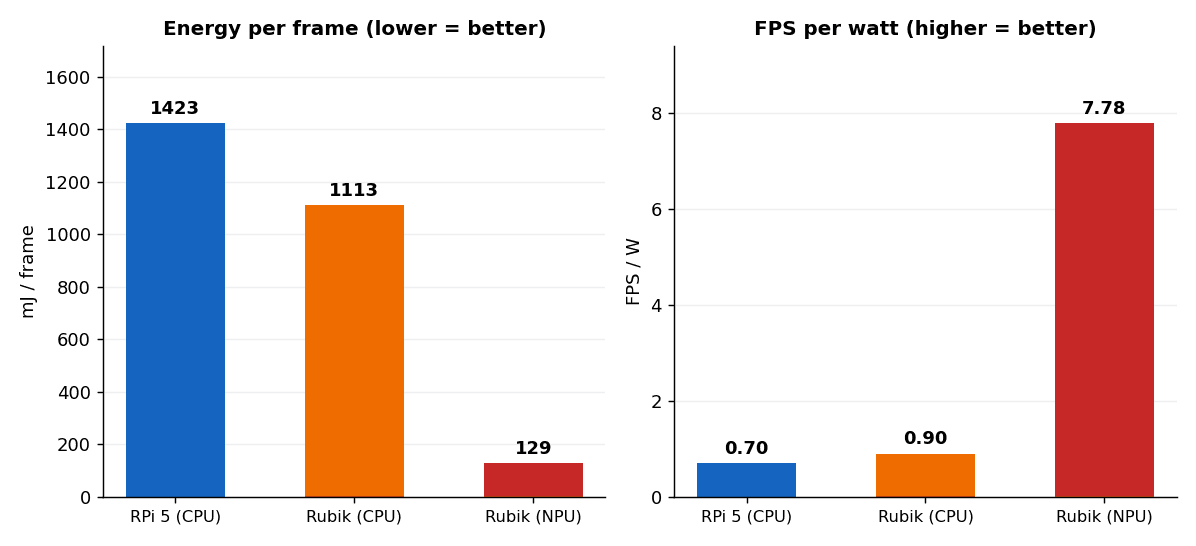
| Energy / frame | 1423 mJ | 1113 mJ | 129 mJ |
| Efficiency (FPS/W) | 0.70 | 0.90 | 7.78 |
Results analysis
Throughput
The NPU hits 34.22 FPS, 8.7× more than the Raspberry Pi CPU (3.91 FPS), both sides in the default configuration. The control run is key: the Rubik’s CPU alone (same board, delegate disabled) manages only 3.44 FPS, ~10× less than the NPU. So the advantage is not a more powerful processor; it is the NPU itself. (On a single thread, the RPi is actually the faster of the two CPUs, but that’s a narrow, specific case: image scaling and the other pipeline stages are faster on the Rubik, and the A78 wins every general CPU benchmark, and this INT8 compute goes to the NPU anyway, so it’s moot on the target path.)
Power
The NPU draws 4.40 W. Less than the RPi CPU (5.56 W) and only a touch more than a single Rubik CPU thread (3.83 W). The point is not raw watts but work per watt: 7.78 FPS/W on the NPU vs 0.70 on the RPi CPU, ~11× more.
Energy per frame
Combining “fast and cool” multiplies the effect: 129 mJ/frame on the NPU vs 1423 mJ on the RPi CPU, 11× less energy for the same work (8.6× vs the Rubik CPU).
Temperature
The NPU is the coolest (~54 °C) and finishes ~9× faster (~44 s vs ~390–440 s). Crucially: by default, no CPU throttles (RPi ~70 °C, Rubik-CPU ~66 °C max) – one thread computes slowly and generates little heat. The thermal problem only appears when you try to catch up to the NPU by adding threads (see the next section).
What if you give the CPU more threads?
By default, LiteRT runs on the CPU single-threaded (we don’t set num_threads). The natural reflex: “give the CPU all its cores and catch up to the NPU.” We checked. We ran the same pipeline through 1…N threads on both boards, measuring power throughout:
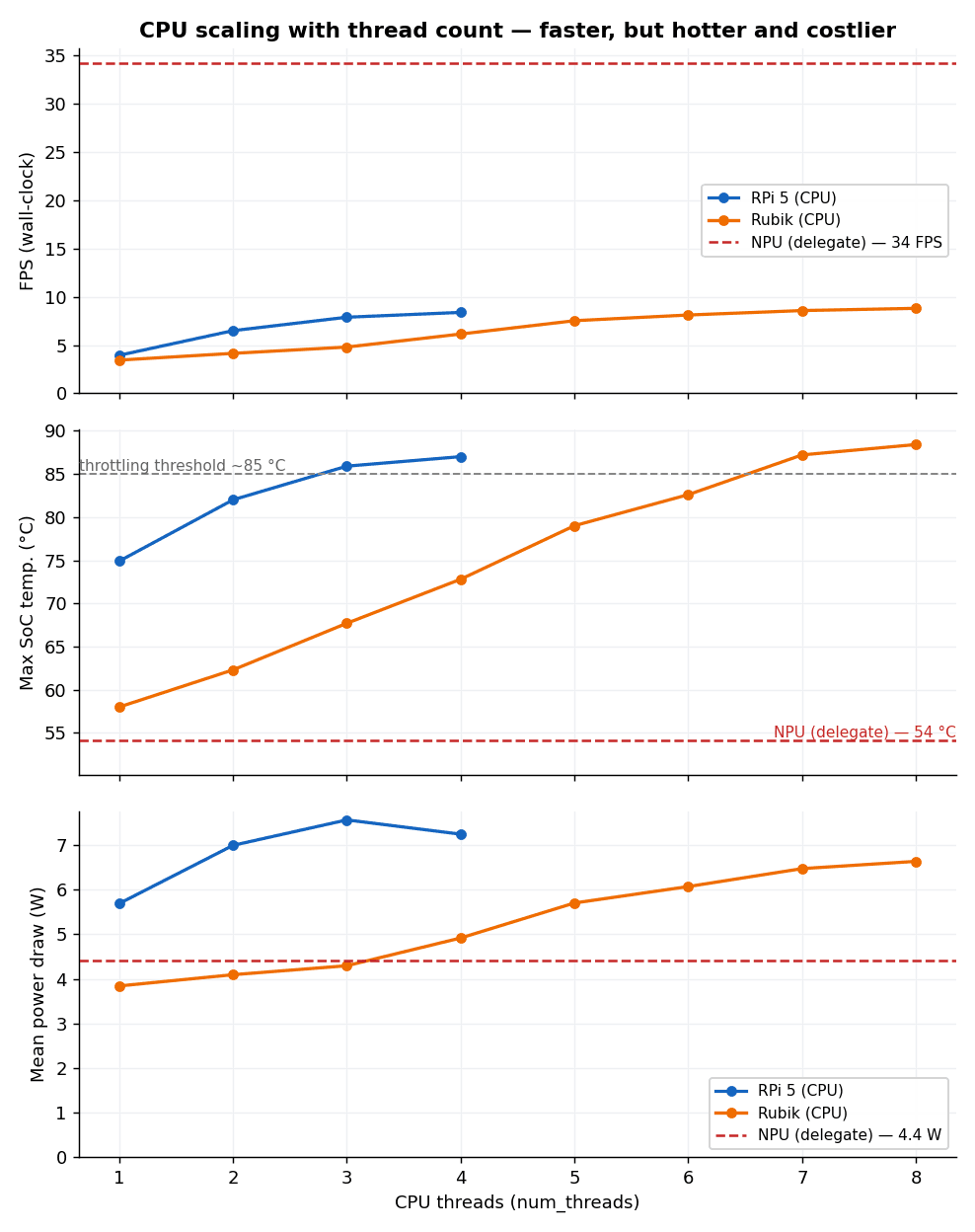
| Configuration | FPS | Power (mean / peak) | Max temp. | Energy / frame |
|---|---|---|---|---|
| RPi 5 – 1 thread (default) | 3.94 | 5.7 W | 75 °C | 1440 mJ |
| RPi 5 – 4 threads (max) | 8.38 | 7.3 / 10.4 W | 87 °C | 860 mJ |
| Rubik CPU – 1 thread (default) | 3.44 | 3.8 W | 58 °C | 1120 mJ |
| Rubik CPU – 8 threads (max) | 8.80 | 6.6 / 9.2 W | 88 °C | 750 mJ |
| Rubik NPU (delegate) | 34.22 | 4.4 W | 54 °C | 129 mJ |
Note: slight data variance in this second run from the data shown in the previous section – due to a change in local environmental conditions (ambient temperature).
Adding threads does speed the CPU up ~2.1–2.6× (the RPi to 8.4 FPS on 4 threads, the Rubik CPU to 8.8 FPS on 8), but at the cost of power and heat: power draw rises (RPi 5.7→7.3 W, with peaks to 10.4 W; Rubik-CPU 3.8→6.6 W) and the temperature jumps by 15–20 °C, crossing the ~85 °C throttling threshold under sustained load (chart above), where the clocks throttle themselves. And the scaling is sub-linear: even a maxed-out CPU (~8–9 FPS) is still ~¼ of the NPU’s throughput, at higher power and temperature.
The NPU delivers 34 FPS at 4.4 W and 54 °C without any tuning.
The clincher is energy per frame: threading lowers it (because it finishes sooner), but even at maximum the CPU still spends ~750–860 mJ/frame, ~6× the NPU’s 129 mJ. Instantaneous power and heat also go up; these drive the PoE budget and enclosure throttling.
What this means for industrial Edge AI enclosure design
The numbers in the table translate directly into edge-device design decisions:
- No throttling in sealed industrial enclosures. Industrial cameras and gateways are mounted in dust- and water-tight enclosures (IP-rated) with no vents. Such a box behaves like a thermos flask. The problem is not delivering power but dissipating the generated heat. This closes the loop with the previous section: to reach a usable frame rate on the CPU, you must add threads, and then under sustained load the SoC hits ~85–90 °C – in an IP-rated thermos that means guaranteed throttling (clocks and FPS drop) or an emergency fan that sucks in floor dust. The NPU delivers 34 FPS at ~54 °C without any tuning and eliminates the problem without active cooling.
- Lower power = convenient PoE supply. 4 W leaves a huge margin in the Power over Ethernet budget. Even the basic 802.3af standard guarantees ~13 W to the end device. A single cable carries data and power (no separate PSUs or 230 V wiring at each point), and the power headroom is enough for extra peripherals. This is not where the NPU’s advantage lies – a thread-tuned CPU (~7–10 W) would also fit within PoE; the difference is made by heat, not power.
- Headroom to scale. 34 FPS on a single stream means real headroom: handling several cameras on one device, or more people in frame, without exceeding the thermal and power budgets.
Conclusion
For a cascaded, multi-model vision pipeline at the edge, a dedicated NPU is not a “nice to have”. It is what determines whether the device can be sealed into an industrial enclosure and powered over PoE at all. And unlocking that advantage costs a single change in the Python code.
From proof of concept to production
This Python implementation is a proof of concept in the proper sense: it answers whether the hardware and architecture make sense before committing further engineering time. On that question, the benchmark is clear. The benchmark numbers are about throughput and heat, but the real payoff is architectural: sealed rather than vented, PoE-powered rather than mains-wired, and built with room to scale rather than already at its thermal limit.
Getting from here to a shipped product raises a different set of questions: how the model holds up across real-world lighting and camera angles, how you manage and update models across a fleet of deployed devices, how the device integrates with existing VMS or NVR systems, and how you validate all of that before it goes into an enclosure you can’t easily open again. These are architecture decisions, not benchmarking ones, and they’re where most of the engineering effort in a production Edge AI device goes.
Check out our follow-up article that explores optimisation techniques for production environments:
Fastest Doesn’t Always Mean Best: Optimising an Edge AI Pipeline on Rubik Pi 3
If you are interested in reproducing these results, the full benchmark code, covering the LiteRT inference pipeline, the thread-scaling tests, and thermal logging, is available on our GitHub. Power was measured externally with a USB power meter (ChargerLAB Power-Z), so it isn’t part of the code.
Designing Edge AI devices? Whether you’re selecting hardware for a thermally constrained enclosure, fighting power budgets, or taking embedded software from BSP through NPU integration to a production-ready vision application, get in touch with the Consult Red team. We help you go from proof of concept to production.
Some images on this page are AI-generated and used for illustrative purposes.
Related Insights
Articles
Fastest Doesn’t Always Mean Best: Optimising an Edge AI Pipeline on Rubik Pi 3
The fastest Edge AI pipeline isn’t always the right one: Python, C++, and GStreamer on the Rubik Pi 3’s NPU, compared on speed, CPU, memory, […]

Videos
Simply Explained: Why Your Router Should Be Doing the AI in the Connected Home
Watch our CTO, Rahul Mehra, unpack the full case for anchoring edge AI in the broadband router.
Case Studies
Secure Hardware Delivered at Speed
UK cybersecurity hardware specialist needed to compress a rapid, high-stakes carrier board design cycle for a new high-speed encryption product, with no margin for rework.